2.3.12

Recipe from my Khmer Cookery Course

I did promise to share some of the recipes from the cookery course I did in Siem Reap and here is a dessert for you.

Nom Tong Noun


Ingredients

Rice flour 1/2 Cup
Duck egg x 2
Sugar 1 tablespoon
Coconut cream 1/2 cup
Black sesame seeds 1 teaspoon
Oil 1/4 cup

Method

1 Set aside one duck egg and the oil
2 Take the rest of the ingredients and combine to make a batter
3 Beat the remaining duck egg and mix with the oil
4 Heat your NTN or waffle pan until its hot
5 On one side brush some of the oil mix - until the side is covered
6 Place your batter on the other side
7 Cook for a few minutes then roll into a cone shape while they are still hot.

These are a delicious snack and perfect to serve with coffee or tea

DW

26.2.12

How to look gud!

Isn't it odd that at the time when we need to be perfect we are often at our most stupid or lax?

Here is an example from one of my own web pages:

"This page begins by reminding us that there is always someone more stupid than we are. However, non of us is perfect so the file then goes on to show us the best way to do things."

Otherwise that is a good page on spreadsheet good practice!

See http://www.duncanwil.co.uk/spread_prac.html

DW

How to Construct a Population Pyramid Style of Chart Using Excel 2007

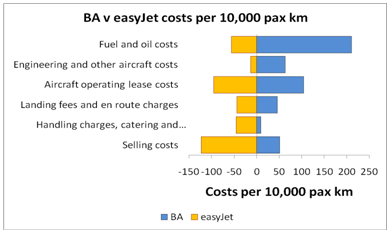
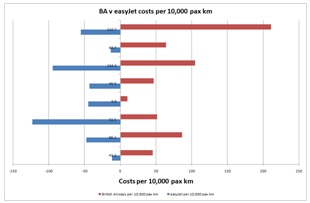
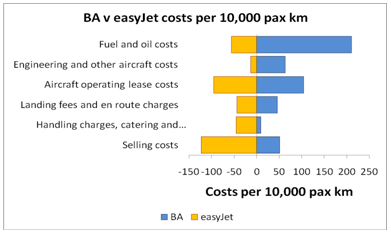
The population pyramid is a very effective way of presenting data in situations in addition to reporting populations. The following example shows how true this is when I compare some basic data for British Airways and easyJet:

Image

This is a very effective form of presentation, don’t you think? It is! After all, there are times when you may well want to compare this year with last, one company with another, male with female … and a table of data or even a line or ordinary bar chart just aren’t effective enough. 

How did I prepare that chart, then, using Excel? What follows is all you have to do!

Firstly, derive, find or grab your data. As you are working along with this example, just copy and paste the following into a blank Excel work sheet:

Image

To begin with, make all easyJet values NEGATIVE. Just put a minus sign in front of them all. It will become obvious why we do this shortly.

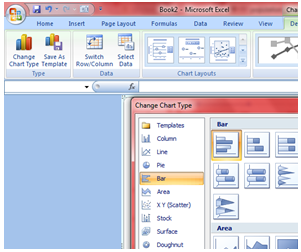
Then select these data and press the F11 key and Excel will then draw a graph for you … automatically. Excel will draw your default style chart when you press the F11 key and the chances are that it won’t look anything like the population pyramid you want but don’t worry! Since we are here to sort that our. Click on the Chart and on the Chart Tools Menu, Design sub menu. You can then change the chart type if necessary ... see the screenshot below to see all of this:

Image

Choose Clustered Bar Chart, as you can see in the dialogue box that follows:

Image

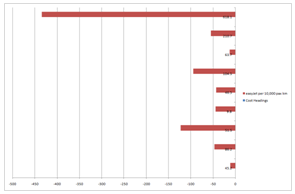
Click OK and you should see something like the following:

Image

If necessary, right click on the chart and select Source Data and click on the Series tab.

Remove the first series per 10,000 pax km

For British Airways, click on the Category Axis Label icon and select the appropriate range, Excel will show it like this ='Sheet1'!$X$X:$X$XX ... it says Sheet1 or whatever it says on the worksheet tab where the data are kept

Now select the second series that also says per 10,000 pax km

Select the Name icon and then select the cell where it says easyJet

Format the chart in terms of title and axes labels as you wish:

Click next again and type in the titles you want to put onto your Chart … you can see what I did. If you are using different data, type what it most informative and appropriate. At this stage, my chart looks like this!

Image

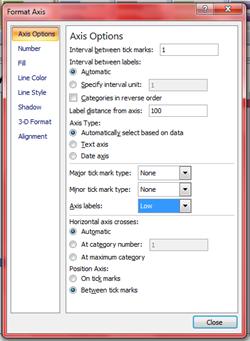
As it stands, the negative values are mixed up with the vertical axis labels. To sort this out, right click the vertical axis and make the following settings:

Image

Image

The legend is very useful for this graph but it is better to put it at the bottom of the chart: right click the legend, Format legend, Placement, Bottom. You should edit the legend so that it reads BA and easyJet rather than the lengthy versions you might be able to read in the chart above. If you chart has a coloured background, it’s best to get rid of it ... and grid lines: right click, clear each of them will do that for you

Change the colours of the bars if you want: right click format … you choose!

Image

Very, very nearly there now. All that’s wrong is that the bars are offset from each other. You could leave them like that but it’s not so attractive is it? So let’s adjust the bars:

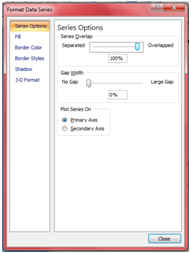
Right-click on any one of the bars and select Format Data Series

Click Options tab and make the following changes:

Overlap = Change this to 100 in the appropriate text box.

Gap width = Change this to 0 or 10 or 20 ... in the appropriate text box ... try them all and see which you prefer

OK

That’s it: you’ve now got a population pyramid of your dreams! Change the colours of the bars as you wish. Change the font and the font size and colour too.

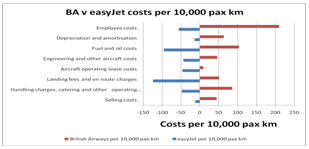
For the final version I have removed the two data points Selling Costs and Handling Charges ... This is my final version: orange bars for easyJet because that’s its house colour … I changed the font size, I put a border on my chart … and so on.

Image

I have taken you through this process step by step. This process is a little complicated but once you have done it twice or three times, you will breeze through it!


Duncan Williamson

25.2.12

Interest Based Functions in Excel

This page has the simple purpose of introducing you to the interest, loans and annuities based functions that Excel has built in to it that you might find of use in your work as an accountant.

The purpose of Excel’s in built functions is that they are fully comprehensive attempts at working out, for example, the interest implications you need to take into account in a variety of settings.

I am demonstrating these functions using Excel 2007: it will be different if you use an earlier version of the software.

Finding what Functions are Available

Open Excel and click on the Insert Function icon:  it looks like this fx and is to be found on the left of the formula bar, as below.
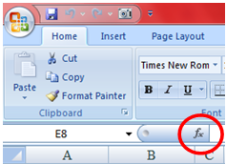
Image

This opens a dialogue box and to find out the categories of function available, click where it says or select a category … highlighted below. Choose from Financial functions, date and time, mathematics and trigonometry … and many more.

We are primarily interested in the financial functions and you are presented with the list of all of the financial function available in your version of Excel … there are many!
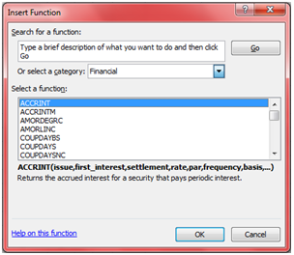
Image

You should see the list beginning with ACCRINT, ACCRINTM ... 

So rather than doing what I have just suggested, let’s target the functions we need specifically. That is, click on fx but this time enter depreciation in the Search for a function area then click Go and it provides you with a list of all in built functions that Excel thinks relate to that search string. 

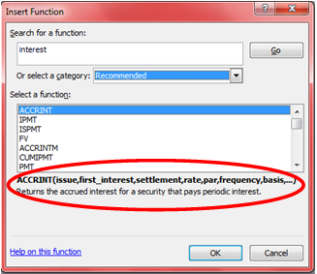
As you can see with the dialogue box here, it shows seven functions in Excel relating to interest although there are 31 in total:
 

Image

You can also see here that when you highlight one of the functions, there is a short explanation of how that function works and what it does.

So we can see that the ACCRINT function is the Returns the accrued interest for a security that pays interest at maturity.


Please note: choose ACCRINTM, as a matter of interest and you will see that it is one of a group of functions that are not available by default. If this function is not available, and returns the #NAME? error, install and load the Analysis ToolPak add-in:


  • Office Button
  • Excel Options…
  • Add-Ins on the left hand menu

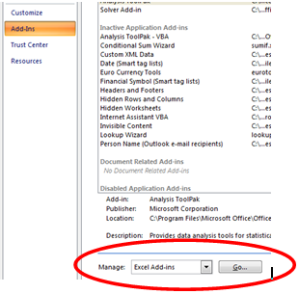
Take a look at the graphic below to see what to do now to install the ToolPak by clicking the go button next to Manage Excel Add-Ins …
Image

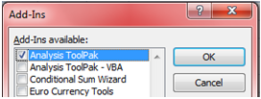
This now opens a dialogue box where you can now select the ToolPak Add-In:
Image

Click OK now and note that you MIGHT have to insert your Office original CD into the drive to install this ToolPak. That #NAME? Error should have disappeared now: if not, close Excel and reopen it and it should have been solved!

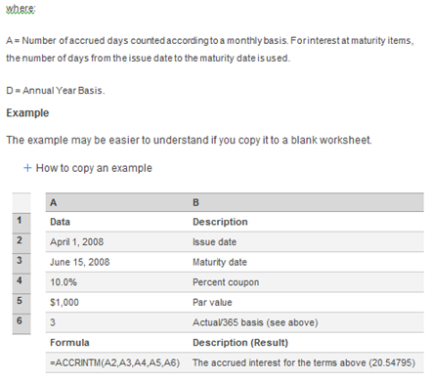
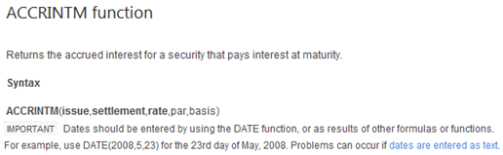
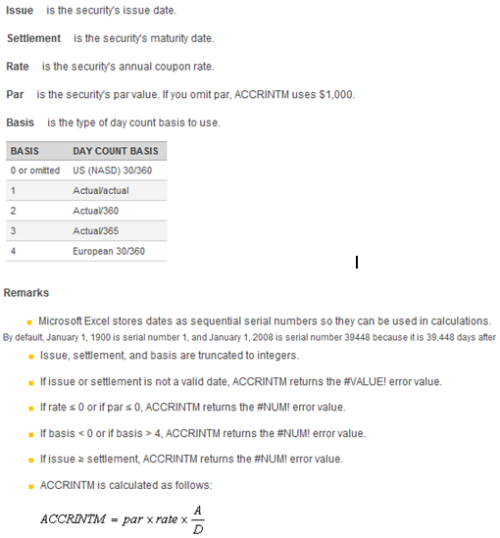
Don’t forget, there is always a link to Excel’s Help files: it’s a hyperlink in blue at the bottom left of the dialogue box. Click on the link and it will explain in detail, with a fully worked example, what to do. The help file for ACCRINTM is:
Image

Image

Image

You can even copy and paste the example into a worksheet and see the function in action.

Interest, Loans and Annuities

You are now aware of the choice of methods for dealing with interest, loans and annuities available as in built functions in Excel. What follows now is a brief review of some of them and some tips on how to set up a worksheet with any or all of the functions built into it.

The functions:

  • FV = future value
  • PV = present value
  • PMT = payment
  • PPMT = principal payment
  • IPMT = interest payment
  • ISPMT = payment interest
  • RATE = interest rate per period
  • NPER = number of periods

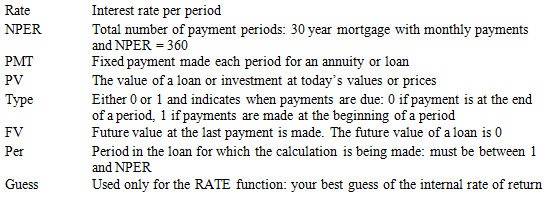
Of course, the chances are that you will not need to use all of these at any one time. I am demonstrating them at one time for convenience! The data we need to calculate and demonstrate these methods are:
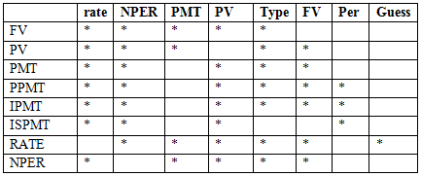
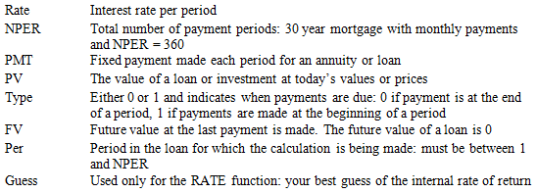
 Image

Image

Range Names 

Before we take this any further, I want to introduce, or remind you of, range names because I am about to set up a worksheet that will allow you to calculate the provisions for depreciation using one or all of the above methods. However, I am assuming that the calculations will relate to the same asset at the same time etc therefore we will be providing for the same asset using the same basic data. 

All we do to assign a range name is the highlight a cell or a range of cells that we would like to give a name to

Then whenever we need to call on or use that value or range, we just enter the range name in the formula or function we are using.

Like this:

I have assigned the range names … NB these relate to depreciation and you should change them if you wish to work with range names for the interest calculations

  • cost to cell B11
  • salvage to cell C11
  • life to cell D11 

Then for the SYD calculation, we would have:

=SYD(cost,salvage,life)

Now you don’t need to look for where the data are to be found, whatever you do to your worksheet and if you change the basic data, the formula automatically finds and updates itself and its result. More than that it doesn’t matter where in your worksheet or file you place your function either, using range names makes it really easy, just use those range names and Excel finds what you want.

Finally for now, if you open up the list of range names and click on any one of those names, the cursor goes to that range: again useful features if you have forgotten the name and where to find it.

Assigning Range Names

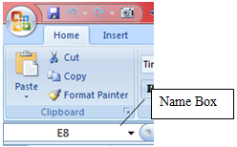
How do you set or assign range names? To assign a range name, highlight the cell or range you want to name and then type your chosen name in the name box:
Image

If you close your spreadsheet and want to work on it again later but have forgotten which range names you have used in it, just click on the down arrow at the right of the name box and the list of names opens for you to use again. Excel never forgets these things!

If you redesign your worksheet or file, you can change the address of the range name … we’ll do that another time. If you are impatient, Excel’s Help files can sort this out with you.

The Interest, Loan and Annuity Spreadsheet

I have set up a really simple spreadsheet to cope with our chosen four methods: it looks like the following in which the range names are
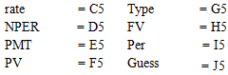
Image

Please note that some of the variables need to be entered as negative values. PMT, for example, the monthly payment amount is negative which reflects that fact that it is a cash outflow. Similarly with PV: as with capital budgeting, we assume here that the initial investment is a cash outflow and hence negative.

In this case, I have set up the spreadsheet for you and worked through all of the calculations: FV is £167,156.1 … what does that mean? PV is £3,790.79 … what does that mean? And PMT, PPMT and so on … what do they all mean?

I hope you have found this page useful and feel free to add your comments to this page to let me know the good and the bad!


Duncan Williamson

19.2.12

The 12 year olds at the BBC

As Ed Reardon points out, the BBC looks as if it is staffed by 12 year olds. I mention here from time to time as well as elsewhere what it is that these 12 year olds are prepared to do.

I have just listened to the final episode of Gulliver's Travels on BBC Radio 4 and half way through that adaptation they make Gulliver say, " ... people are starving out there."! Out there ... this comes from the X Files, of course when we learned that, "The Truth is Out There"!

A clot on Radio 4 has just said that, "... the stand out character ... ". We used to have outstanding things until the 12 year olds decided that they would go to Oxbridge for their degrees but working class USA as the source of all changes in English English.

Now they are reading from a short story in which the author has let us know that he knows the proper names of several parts of the human brain and their processes. He then told us that a bullet left  a brain having exited it: what kind of a nonsense word is that?

DW

18.2.12

Rachmaninov's 2nd Piano Concerto

There is a programme on BBC Radio 4 at the moment and they are discussing Rachmaninov's 2nd Piano Concerto. This is one of my favourite pieces of music and I recommend it strongly to everyone.

DW

10.2.12

Plane Spotters!

After spotting planes myself this afternoon, I went to the rooftop pool/bar and started snapping photos as planes took off from the airport and headed my way.

I saw a chap with his computer ... and he stood up and started looking through his binoculars. I then noticed that he was locating and looking at planes that seemed to be in random parts of the sky! I then noticed that he was running plane spotting software ... After that I noticed another man, other side of the pool, doing the same. This chap had HUGE bins though!! Take a look at the photos ... I threw in a pigeon too. By the way, zoom in on the bird and it's feathers are suave!


And here's a photo I took and cropped earlier! It's Emirates' aeroplane A6-EMM, a Boeing 777-31H that first flew in 1999.


DW

9.2.12

How did this happen?

Excel 2007 with a worksheet 180,000 lines deep ... only 5 columns.

I prepared a data profile that included classifying the data and then using SUM to add up the values.

I prepared another analysis as preparation to draw a histogram and then used SUM to add up the values.

Then  I created a very simple IF statement to check that total 1 =  total 2 ... they didn't agree. For some reason, although ALL values have only two decimal places, when added together, total 1 could be expanded to ...247.900883 while total 2 could be expanded to 247.90003.

As a workaround I amended the IF statement:

=IF(INT(A1)=INT(B1),"Reconciled","Error") ... that worked

and so did this:

=IF(ROUND(A1,3)=ROUND(B1,3),"Reconciled","Error") but =IF(ROUND(A1,4)=ROUND(B1,4),"Reconciled","Error") did NOT work, for what is probably an obvious reason!


Duncan Williamson


3.2.12

You get what you pay for ... another top tip!

Have been food shopping at M&S of late and it is definitely a good thing to do. Well, mainly! Yesterday I was buying milk and saw a bargain: a pint of milk marked down to 10 pence so I bought it.

In the evening I was drinking coffee and thought, eeeuuggghhh! What's happened to that??

The penny dropped eventually. Cheap milk and good coffee do not mix.

Otherwise, M&S food is very good.

DW

30.1.12

Test Match Special

I have been given the opportunity of returning to Dubai again next week and whilst I will be there, most of the third Pakistan v England cricket test match will be played. Whilst I work every day until around 2:30 - 2:45, I have bought tickets for Sunday and Monday to go and watch the game.

Watch this space for photos and other observations.

DW

Eye? Aye!

Everyone who comes here regularly knows that two years ago to the day I had an operation to correct a detached retina in my right eye. As is normal, given the treatment I received, I also needed a lens replacement in the same eye around 6 months later.

Not perfect but I have absolutely no complaints at all: the knowledge and skills of the surgeon and his team to rebuild my retina from outside fills me with massive admiration.

Well, a month or so ago I realised that the vision in my right eye had regressed: nothing like the same symptoms as the PVD I had and then the detached retina. More of seeing through watered down milk. I monitored carefully as I travelled away from home and did a bit of reading about what might be wrong.

In the end I wasn't worried but of course I had to see an eye specialist and did that on Friday of last week. The diagnosis is that my new lens is attracting gunge to it: much quicker than normal, apparently, the lens has clouded over somewhat, explaining the effect of looking through watered down milk!

I need to have to lens laser zapped now so I am waiting for that to happen.

In the meantime, I am seeing things in a lop sided way as watered down milk vision is blurry vision!

DW

27.1.12

Managing and Interfering

Nick Edwards has written a very engaging autobiography that I recommend everyone to read.

Edwards is a doctor in an A&E department at a General Hospital somewhere in the UK. The book discusses two main themes:

medical stories
management and interference stories

I enjoyed the book and reviewed it in full for my own web site: http://www.duncanwil.co.uk/book_reviews/edw.html

DW

25.1.12

What I have been up to!

Those of you who see me on Facebook and Twitter know that after a week at work in Dubai I have spent almost two weeks in the Far East: Cambodia, Singapore and Bangkok. I am in Bangkok now and will fly out of here tonight to go home via Dubai: Airbus A380 all the way to Manchester.

Anyway, here are some links to two slideshows I have put together for you: one shows me at work in the kitchen, cooking Khmer food, in Siem Reap; and the other shows snaps I took in Singapore.

Enjoy them and all feedback is gratefully received.

http://www.youtube.com/watch?v=kjTPQxmCha4&feature=youtu.be

http://www.youtube.com/watch?v=84dIBPHj1zQ&feature=youtu.be

DW

9.1.12

What a (Little) Gentleman!


The wallpaper on my iPad is of the new Bentley V8 superb looking vehicle: that really is a lottery win dream. Here is that photo, courtesy of those awfully nice Bentley people themselves!

Anyway, as I was returning to my room at the hotel, I saw a massive Bentley outside of the back entrance. There were a few people milling around, including the driver, who was wearing a baseball cap!

A tiny man, all dressed in white but with a significantly bald head, walked slowly towards the car with his hands behind his back and his head semi bowed down. The driver opened the back door for the man who almost vanished inside that cavernous vehicle as he climbed inside.

Behind this man was a woman of the same height, wearing a sari: she was following the man fairly closely and as he climbed into the car she stopped. She was waiting for the man to move over to let her in: he didn’t. Dignity maintained, as her halt was fleeting, she quickly changed her direction and went round the back of the car and the driver opened the rear door on the other side of the car to let her in.

Man and woman were now ensconced and the driver went round the car again, to get into the driving seat.

A young man and woman were now left on the pavement and clearly they were confused as the young woman made a move as if to open the driver’s door but she also halted fleetingly before she changed direction and the couple started to walk away.

At this point I heard myself say, what a shitty little man, a shitty little man; and left the scene to return to my room.

Lovely car, though!

As I was in the lift a memory came flooding back of a situation that arose in Almaty back in 1998/99. We had arrived there in August 1998 and after a whole term of living in a dormitory, we were given some hope of moving out into the community and living in our own flats or houses.

We were asked to describe our hopes and aspirations for the housing we were asking for and one of our team wrote the most inappropriate list of demands one could ever imagine. We were in post Soviet Kazakhstan where the majority of the population didn’t have two ha’pennies to rub together; flats and houses were often dangerously badly built; as many as three and even four generations of families shared one flat; and the furniture was Soviet utility style and standard.

Apart from tiger skin rugs, Italianate furniture and bath fittings, this colleague, also a small man, asked for a king sized bed with some outrageous bedding and a duck down duvet! This latter request led me to make a drawing of the impact of this request having been granted.

As a matter of interest, I last saw this man in 2003 when he left our project and I heard nothing about him until late last year, 2011, when I saw him on one of the social networking sites and he had written this astonishing plea: la la la, I am looking for work but have been unemployed for two and a half years … Well, this man is the best part of 80 years old now so fair play to him that he might be capable of working. However, trying to generate sympathy as a reason for giving someone a job is not the best of strategies in my book. 


DW

4.1.12

Cheating Examiners: a GLIMMER of hope?

In addition to my earlier post, http://duncanwil.blogspot.com/2012/01/cheating-examiners-another-secretary-of.html, I am a little encouraged by some of the correspondence I have seen over this matter.

Sec of State Gove’s speech, linked to in my post, is so badly littered with literary allusions as to make it unreadable. The other two letters mention education assessment markets, textbooks and other forms of communicating with teachers and students. As long as honest and independent people are allowed into this debate there might be some hope.

However, given the history of this debate I am really wary of the vested interests that litter the education market now and that are bound to cause problems for us all.

DW

Reminder of those letters:

http://media.education.gov.uk/assets/files/pdf/l/letter%20to%20ministers%20from%20glenys%20stacey%20-%2028%20nov%202011.pdf

http://media.education.gov.uk/assets/files/michael%20gove%20letter%20to%20glenys%20stacey.pdf

Cheating Examiners: ANOTHER Secretary of State fobs me off!

In December 2011, I wrote to Secretary of State Michael Gove, among others, on the subject of the role and responsibilities of GCSE and A Level Examiners. I simply pointed out that abuse of position is well known and has been going on for years. Moreover, I told him that I had told him this before.

I got a response on 29th December 2011 that told me that Sec of State Gove is too busy to write to me but a minion has been delegated to write to me … here is Mr Haynes’ reply (don’t you just love the century’s old Mr Haynes!!)

--oo0oo--

Dear Mr Williamson

Thank you for your email of 11 December, addressed to the Secretary of State, about alleged exam malpractice. As you will appreciate, the recent media coverage has generated a considerable amount of correspondence and the Secretary of State is therefore unable to reply personally. It is for this reason I have been asked reply.

Ministers have always been committed to significant reforms of the exams system. To restore standards and faith in the system, Ministers have already:

  • legislated so that the exams regulator, Ofqual will be able to fine exam boards
  • legislated to give Ofqual freedom to raise the standard of qualifications; and
  • reformed the performance table system for schools, so that only performance in the most valuable qualifications for young people will count. 

More recently, the Secretary of State commissioned Ofqual to conduct an urgent inquiry into the allegations over the exam system in the Daily Telegraph. The Secretary of State welcomed Ofqual’s initial report that was published on 21 December and the actions they have in hand to repair the damage the revelations have done to the reputation of exams. Details of Ofqual’s report and the Secretary of State’s response can be found at: http://www.education.gov.uk/inthenews/inthenews/a00201221/michael-gove-letter-to-ofqual

You may also be interested in the statements I have included below, from Ministers, setting out their views over the need for urgent reform of the exam system. 

  • In an interview in The Times in June, the Secretary of State declared that one of his chief aims as  Education Secretary was to ‘change our discredited exam system’.
  • The Secretary of State gave a speech at the Standards Summit convened by the qualifications regulator, Ofqual on 13 October – seehttp://www.education.gov.uk/inthenews/speeches/a00199197/michael-gove-to-ofqual-standards-summit
    He spoke about a range of issues over standards including the risk of a ‘race to the bottom’: 'It’s important that collectively we recognise that exam boards and awarding bodies, in the natural and healthy desire to be the best as an exam board, don’t succumb to the commercial temptation to elbow others out of the way, by saying to schools and to others “we provide an easier route to more passes than others.”'
  • In an exchange of letters between the Schools Minister and Ofqual on 29 November – see http://www.ofqual.gov.uk/news-and-announcements/128/807- the Minister highlighted the following: ‘In our view, the chief risk of market failure with qualifications, particularly pre-19 qualifications, is in relation to standards – the so called ‘race to the bottom’. The nature of competition seems to present significant risks of awarding bodies producing more accessible specifications, with content which is less intrinsically challenging, in order to capture market share’. And, in relation to awarding bodies being involved in the publication of textbooks, ‘To protect public confidence in the system and to manage conflicts of interest effectively, we need the highest possible ethical standards, combined with a fully transparent system.’
  • The Secretary of State’s initial statement about the exams system in the light of the recent Daily Telegraph articles – see http://www.education.gov.uk/a00200596/michael-gove-responds-to-the-daily-telegraph-investigation - included the following: “Our exams system needs fundamental reform. [These] revelations confirm that the current system is discredited. … As I have always maintained, it is crucial our exams hold their own with the best in the world. We will take whatever action is necessary to restore faith in our exam system. Nothing is off the table.”

You may be aware that changes to GCSEs are being introduced. The following link provides information:

http://www.ofqual.gov.uk/news-and-announcements/130-news-and-announcements-press-releases/820-ofqual-confirms-changes-to-gcses

Thank you for taking the time to write with your comments and concerns.
Yours sincerely

Mr G. Haynes
Public Communications Unit
www.education.gov.uk

As part of our commitment to improving the service we provide to our customers, we are interested in hearing your views and would welcome your comments via our website at www.education.gov.uk/pcusurvey

Your correspondence has been allocated the reference number 2011/0083207. To contact the Department for Education, please visit www.education.gov.uk/contactus

2.1.12

Cheating Examiners: letter to JCQ

Here is the text of a letter I have just sent by email to Dr Jim Sinclair, Director of JCQ:

Dear Dr Sinclair,

I read your report, A preliminary report to the Secretary of State for Education on allegations made in the Daily Telegraph; and I have to say it is a complete waste of time. I am saddened that it seems to me that we are going through another round of discussions in which everyone knows that there are significant irregularities in the system and yet because of vested interests, no one feels able to do anything about them. The only crumb of comfort in your report is that it says it is a preliminary report.

I am just hoping that in spite of Mr Gove already having been informed about the problems latterly raised by the Daily Telegraph and already having ignored them, things will change this time.

I have been working on this problem for several years now and have provided reams and reams of proof of misdeeds. One day, someone of integrity will take note of my findings and the findings of others and take the appropriate action. So far, you have proven that you are not that person.
Best wishes for the new year


Duncan Williamson


Daughter Fran, an inspiration to us all!

Take a look at my daughter Fran’s Blog: she just posted a bit about what she has achieved in 2011. Mind boggling!

What Fran can do with an unbroken spirit inside her broken body should put all moaning minnies to shame.

DW

1.1.12

Happy New Year

Welcome to all of my visitors, both to this blog and my web sites.

I hope 2012 turns out to be a good year for you, in every way.

I normally don't single out anyone or anything for special new year wishes but this year I will make an exception.

After spending almost two years in Afghanistan I came to meet and work with a lot of people who give me hope for their future. Then again, I met and worked with some people whose vision and objectives for their country are difficult to fathom.

We worked in the education sector and made a difference to the lives of thousands of young people and their families.

Driving across Kabul on a daily basis showed me that ordinary Afghans would do what they had to do to survive: from opening and managing small businesses to selling family heirlooms and to begging.

The big men in their massive and expensive houses are far removed from the lives of the people of Afghanistan. Political cowards who take decisions on the basis of the last person to see them ruin the work of the government.

People like William Hague and Hillary Clinton and their kind are the wrong people to help to oversee the changes needed to be made to help Afghanistan. I say this because these people are top down politicians and Afghanistan needs bottom up thinkers and managers.

Give the good people of Afghanistan the chance to live honourable and safe lives.

DW

30.12.11